Chrome Web Store Search API
Our Chrome Web Store API allows you to scrape extensions and themes from the Chrome Web Store search results. For each item, the API returns its extension ID, title, icon, promo image, description, type, category, rating and number of ratings, number of users, website, and whether it has the verified publisher and Featured badges.
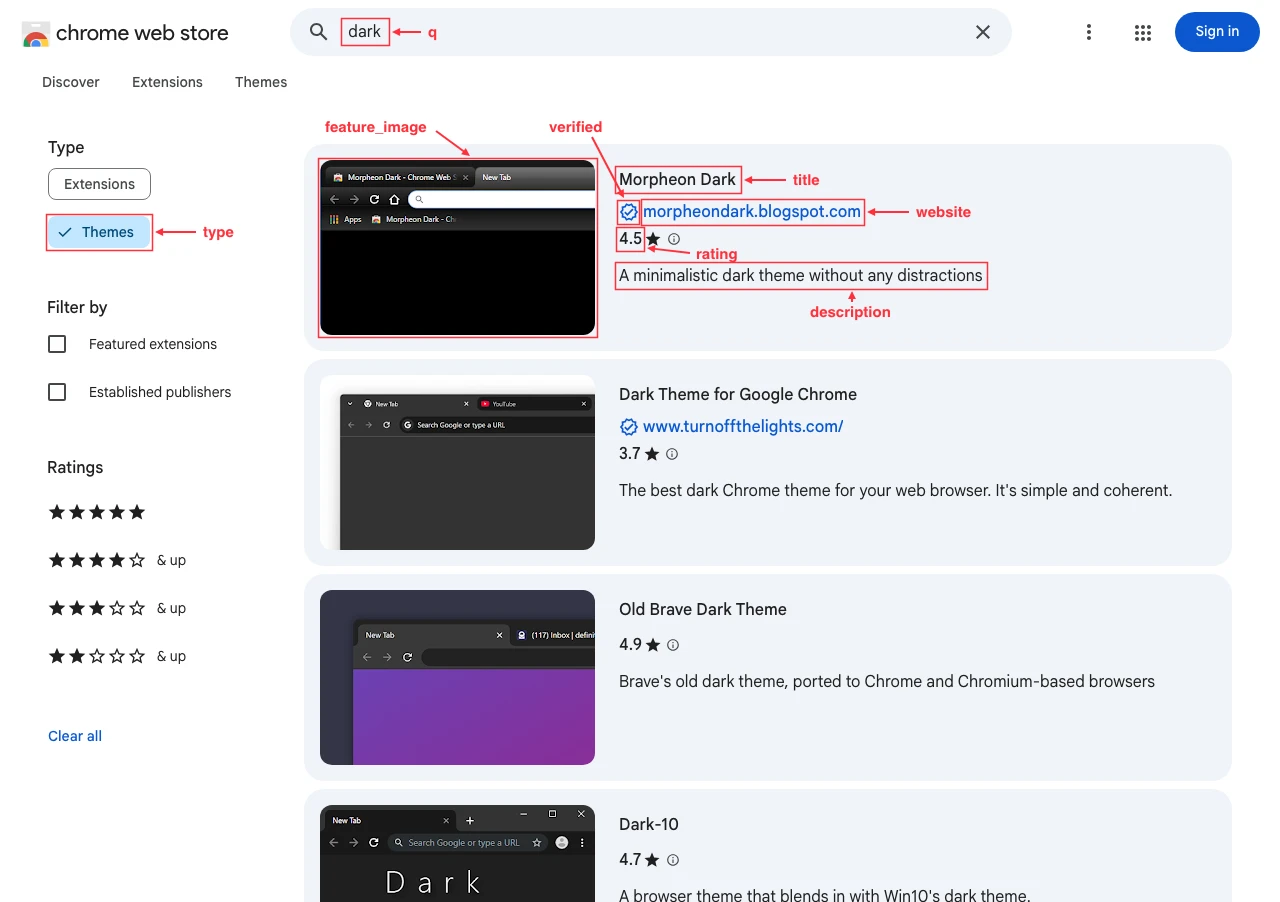
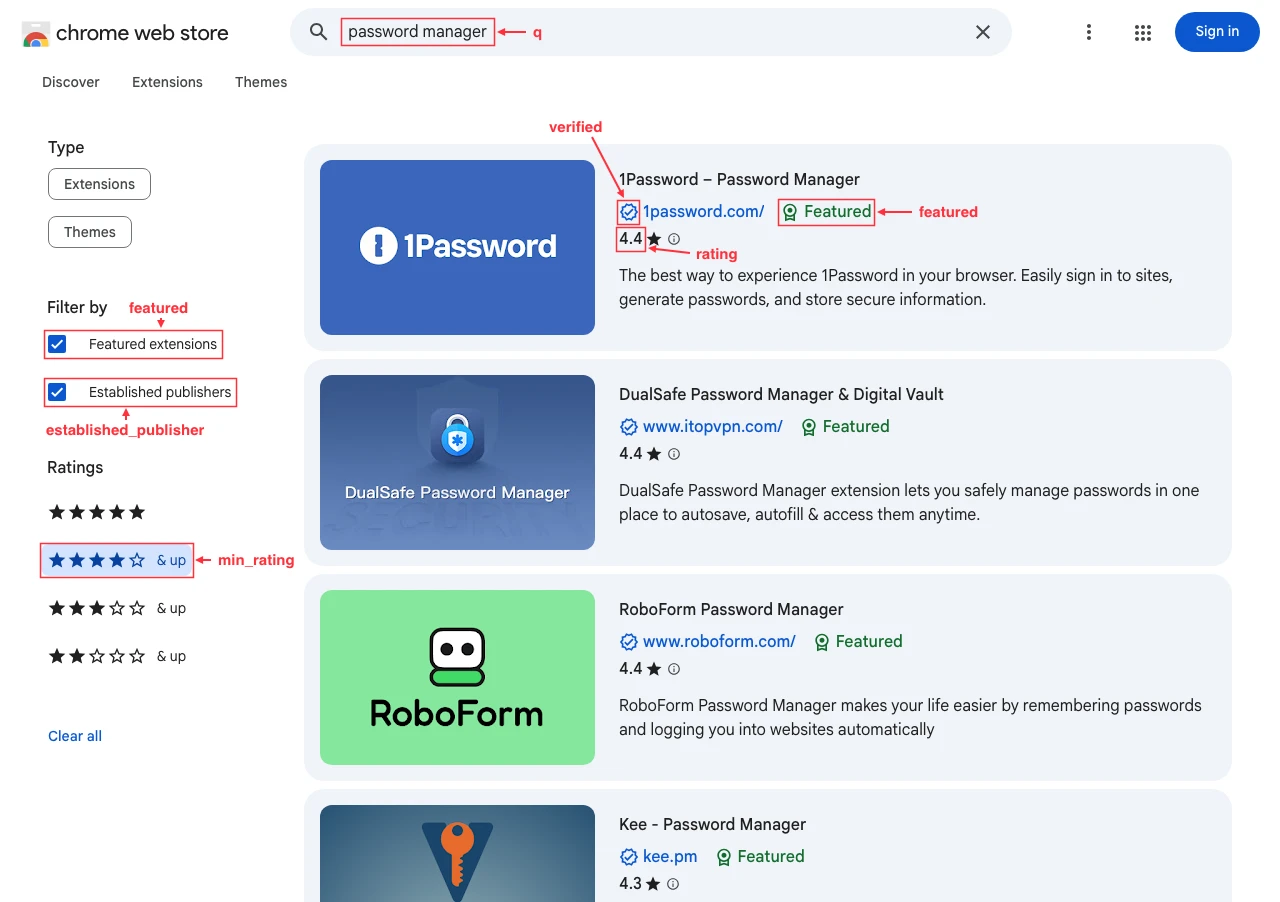
Filter the results like on the Chrome Web Store with type, min_rating, featured, and established_publisher, and get up to 100 results per request with num. The next page of results is available with next_page_token.
The API endpoint is https://serpapi.com/search?engine=chrome_web_store
Head to the playground for a live and interactive demo.
API parameters
Localization
hl
Optional
Parameter defines the language to use for the Chrome Web Store search. It's a two-letter language code (e.g., en (default) for English, de for German, or ja for Japanese). Head to the Google languages page for a full list of supported Google languages.
Advanced filters
type
Optional
Parameter defines the type of items to search for. By default, both extensions and themes are returned.
Available options:extension - Extensionstheme - Themes
min_rating
Optional
Parameter defines the minimum rating of the items, like the rating filter of the Chrome Web Store.
Available options:5 - 5 stars4 - 4 stars and up3 - 3 stars and up2 - 2 stars and up
Pagination
 SerpApi parameters
no_cache
Optional
Parameter will force SerpApi to fetch the Chrome Web Store results even if a cached version is already present. A cache is served only if the query and all parameters are exactly the same. Cache expires after 1h. Cached searches are free, and are not counted towards your searches per month. It can be set to false (default) to allow results from the cache, or true to disallow results from the cache. no_cache and async parameters should not be used together.
async
Optional
Parameter defines the way you want to submit your search to SerpApi. It can be set to false (default) to open an HTTP connection and keep it open until you got your search results, or true to just submit your search to SerpApi and retrieve them later. In this case, you'll need to use our Searches Archive API to retrieve your results. async and no_cache parameters should not be used together. async should not be used on accounts with Ludicrous Speed enabled.
zero_trace
Optional
Enterprise only. Parameter enables ZeroTrace mode. It can be set to false (default) or true. Enable this mode to skip storing search parameters, search files, and search metadata on our servers. This may make debugging more difficult.
output
Optional
Parameter defines the format of the result. It can be set to json (default) to get a structured JSON of the results, html to get the raw HTML retrieved, or md to get a Markdown-formatted version optimized for LLMs and AI agents.
json_restrictor
Optional
Parameter defines the fields you want to include in the output, reducing payload size for faster response. See the JSON Restrictor documentation for more details.
API results
JSON results
JSON output includes structured data for organic results.
A search status is accessible through search_metadata.status.
It flows this way: Processing -> Success || Error.
If a search has failed, error will contain an error message.
search_metadata.id is the search ID inside SerpApi.
HTML results
This API does not have a full HTML response, only text.
search_metadata.prettify_html_file contains a link to the prettified version of the result.
It is displayed in the playground.
Markdown results
Markdown output is optimized for LLMs and AI agents. It provides a curated view of the JSON results
in a token-efficient format using tables, markdown links, and YAML frontmatter.
To access, use the output=md parameter, the /search.md endpoint, or request header Accept: text/markdown.
API examples
Results for q: adblock
Results include both extensions and themes by default, with their type. total_results is the number of results the Chrome Web Store reports for the search, and serpapi_pagination.next is the link to the next page of results.
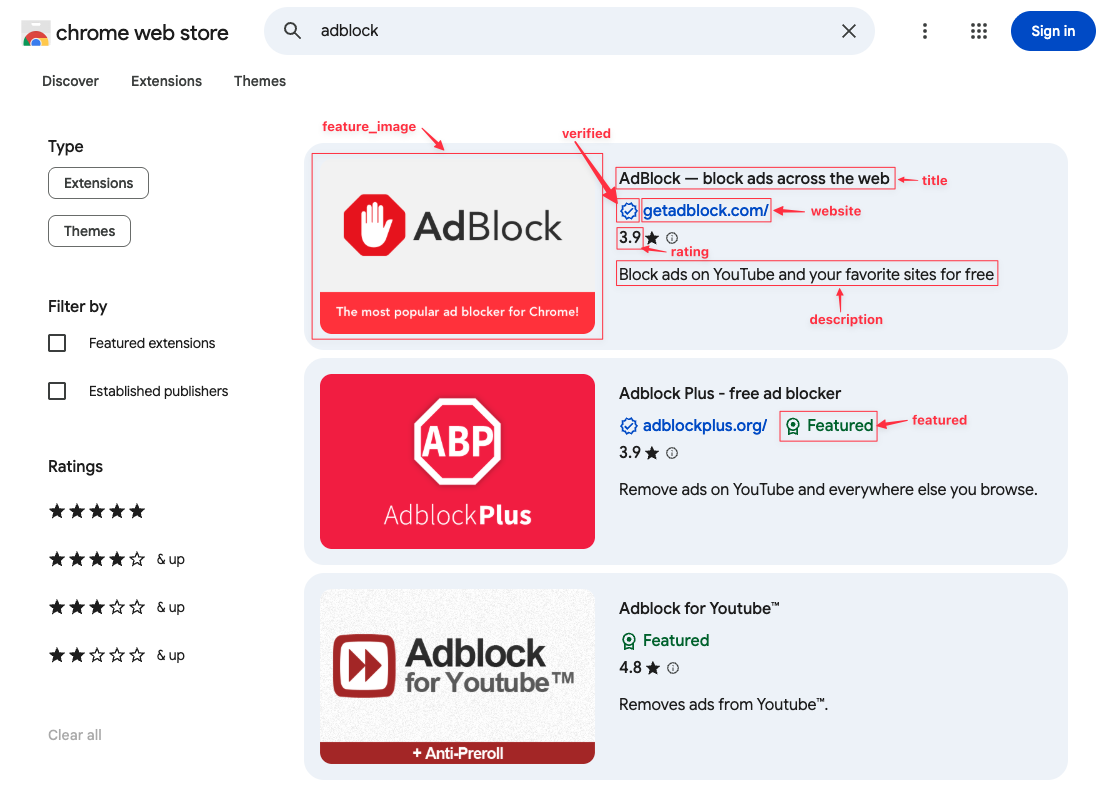
{
  ...
  "search_information": {
    "total_results": 204
  },
  "serpapi_pagination": {
    "next": "https://serpapi.com/search.json?engine=chrome_web_store&hl=en&next_page_token=QVdDeUxMUy1ac1BJMW9xU2lPdGtleVJSNDdZTW5qeUl2aElTNGx2UDJvSWxiVEEtN1F6bnFDTVBteGdlM21ETXZRPT0%3D&q=adblock",
    "next_page_token": "QVdDeUxMUy1ac1BJMW9xU2lPdGtleVJSNDdZTW5qeUl2aElTNGx2UDJvSWxiVEEtN1F6bnFDTVBteGdlM21ETXZRPT0="
  },
  "organic_results": [
    {
      "position": 1,
      "title": "AdBlock — block ads across the web",
      "extension_id": "gighmmpiobklfepjocnamgkkbiglidom",
      "link": "https://chromewebstore.google.com/detail/gighmmpiobklfepjocnamgkkbiglidom",
      "thumbnail": "https://lh3.googleusercontent.com/mgNKV-3VMXD556WVUiWSbcukQQN-il4Zlqq03efTjG2B5j9YP7Fxr3idTQ_G0JFD7E6o4TMwvTQTleDn_8UdFLf5VQ",
      "feature_image": "https://lh3.googleusercontent.com/3WssruYpy1oFSsMEQol5IZFGPYI7uYgwfekPl85NqKaUxu2bJsveNdO9oII2fYeBgznWbL-X5AtBidNa9ddFowwd7pM",
      "description": "Block ads on YouTube and your favorite sites for free",
      "type": "extension",
      "category": "productivity/workflow",
      "rating": 3.9,
      "reviews": 290273,
      "users": 65000000,
      "website": "http://getadblock.com/",
      "verified": true
    },
    {
      "position": 2,
      "title": "Adblock Plus - free ad blocker",
      "extension_id": "cfhdojbkjhnklbpkdaibdccddilifddb",
      "link": "https://chromewebstore.google.com/detail/cfhdojbkjhnklbpkdaibdccddilifddb",
      "thumbnail": "https://lh3.googleusercontent.com/nnMASpwJY4U5ukhKl4PfIdaOpuKXNrVvfIc9n8-NJOJIY7m3RLgsazN6ATmDkXyaMll8zADOXuBR574MwC7T71kJcQ",
      "feature_image": "https://lh3.googleusercontent.com/5KhDb_CYPuUIBdZgLu4AOFIRjerLSQdC9Jrbv5ReXPQudO7_RlcNHZZJDqNrWQpoN2-xMg20j2uASzVdBoI1sq0kECo",
      "description": "Remove ads on YouTube and everywhere else you browse.",
      "type": "extension",
      "category": "productivity/workflow",
      "rating": 3.9,
      "reviews": 188134,
      "users": 40000000,
      "website": "http://adblockplus.org/",
      "verified": true,
      "featured": true
    },
    ...
  ]
}
Example with type: theme
{
  ...
  "organic_results": [
    {
      "position": 1,
      "title": "Morpheon Dark",
      "extension_id": "mafbdhjdkjnoafhfelkjpchpaepjknad",
      "link": "https://chromewebstore.google.com/detail/mafbdhjdkjnoafhfelkjpchpaepjknad",
      "thumbnail": "https://lh3.googleusercontent.com/javmQ38Bi9ItF9-J7wqn9uZw0rJO6EZCrxykub9xWKovzN2W8kxULhQPb4JCnxeCGmFO3kRCsBUsMPMUTPi49YHZfg",
      "feature_image": "https://lh3.googleusercontent.com/9D0ptG7ovDcAWcbde7ERzhuUDcK_6ke6iIXmqcAeYILliu00nLQ3-lF7THV5D6Acy-fDKDulqBNd57mLLaprWTy_",
      "description": "A minimalistic dark theme without any distractions",
      "type": "theme",
      "category": "dark",
      "rating": 4.5,
      "reviews": 9548,
      "users": 1000000,
      "website": "morpheondark.blogspot.com",
      "verified": true
    },
    ...
  ]
}
Example with featured, established_publisher, and min_rating
{
  ...
  "search_information": {
    "total_results": 25
  },
  "organic_results": [
    {
      "position": 1,
      "title": "1Password – Password Manager",
      "extension_id": "aeblfdkhhhdcdjpifhhbdiojplfjncoa",
      "link": "https://chromewebstore.google.com/detail/aeblfdkhhhdcdjpifhhbdiojplfjncoa",
      "thumbnail": "https://lh3.googleusercontent.com/DftM3biDXufonobNWlKgO74qdJosSFjMay_Ku9aIinJwwmtp-hv3Psof4nxKp2mjf6Lgu-pHWPAaPXz7Rs3Uwzen",
      "feature_image": "https://lh3.googleusercontent.com/ynRztdC5-1UbAl4ZToSArbelUmwL_DDEEfQfwopuOMasKATHcxrE4zYBfIsYCj_YAevc1mHL58JYbwzT5-lXUFT8cAc",
      "description": "The best way to experience 1Password in your browser. Easily sign in to sites, generate passwords, and store secure information.",
      "type": "extension",
      "category": "productivity/workflow",
      "rating": 4.4,
      "reviews": 4260,
      "users": 7000000,
      "website": "https://1password.com/",
      "verified": true,
      "featured": true
    },
    {
      "position": 2,
      "title": "DualSafe Password Manager & Digital Vault",
      "extension_id": "lgbjhdkjmpgjgcbcdlhkokkckpjmedgc",
      "link": "https://chromewebstore.google.com/detail/lgbjhdkjmpgjgcbcdlhkokkckpjmedgc",
      "thumbnail": "https://lh3.googleusercontent.com/PDr1h2hfI39cPiHxzIOUXCOWvyeJnrAJOWmoPZ1krVVop2HuSIvQ7M4iZ590VRWU4ELBdMm_d0kNuFREOx6OBwJavQ",
      "feature_image": "https://lh3.googleusercontent.com/D6vdmRoF5T_R_oyCbBCfP0kzEF7au-yB7ttWTt11pU17erDH-8VTV1BajLsHzluPbz0owP_xzVRk7oKMWJyO0p3O1A",
      "description": "DualSafe Password Manager extension lets you safely manage passwords in one place to autosave, autofill & access them anytime.",
      "type": "extension",
      "category": "make_chrome_yours/privacy",
      "rating": 4.4,
      "reviews": 25,
      "users": 200000,
      "website": "https://www.itopvpn.com/",
      "verified": true,
      "featured": true
    },
    ...
  ]
}
JSON structure overview
{
  ...
  "search_information": {
    "total_results": "Integer - Number of results the Chrome Web Store reports for the search. Paging through them can return fewer results.",
    "organic_results_state": "String - 'Fully empty' when the page has no results and there is no next page."
  },
  "serpapi_pagination": {
    "next": "String - Link to the next page of results. Missing on the last page.",
    "next_page_token": "String - Token of the next page of results, for the next_page_token parameter. Missing on the last page."
  },
  "organic_results": [
    {
      "position": "Integer - Position of the item in the results of the page.",
      "title": "String - Title of the item.",
      "extension_id": "String - ID of the item on the Chrome Web Store, which is also its Chrome extension ID.",
      "link": "String - Link to the page of the item on the Chrome Web Store.",
      "thumbnail": "String - Link to the icon of the item.",
      "feature_image": "String - Link to the promo image of the item, as shown in the search results. Missing when the item has none.",
      "description": "String - Short description of the item.",
      "type": "String - Type of the item. (Ex. extension, theme)",
      "category": "String - Category of the item. (Ex. productivity/workflow, make_chrome_yours/privacy, dark) Missing when the item has none.",
      "rating": "Float - Average rating of the item, out of 5. Missing when the item has no ratings.",
      "reviews": "Integer - Number of ratings of the item. Missing when the item has no ratings.",
      "users": "Integer - Number of users of the item. Missing when the Chrome Web Store has no count for the item.",
      "website": "String - Website of the publisher: a link (Ex. http://getadblock.com/) or a domain (Ex. kee.pm). Missing when there is none.",
      "verified": "Boolean - True for items with the verified publisher badge. Missing otherwise.",
      "featured": "Boolean - True for items with the Featured badge. Missing otherwise."
    },
    ...
  ]
}