Google Flights Autocomplete API
Our Google Flights Autocomplete API allows you to get location suggestions for a keyword.
The API endpoint is https://serpapi.com/search?engine=google_flights_autocomplete
Head to the playground for a live and interactive demo.
API Parameters
Localization
gl
Optional
Parameter defines the country to use for the Google Flights Autocomplete search. It's a two-letter country code. (e.g., us for the United States, uk for United Kingdom, or fr for France) Head to the Google countries page for a full list of supported Google countries.
hl
Optional
Parameter defines the language to use for the Google Flights Autocomplete search. It's a two or three-letter language code. (e.g., en for English, es for Spanish, or fr for French), optionally followed by a two-letter or three-digit region code (e.g., en-gb for British English, or es-419 for Latin American Spanish). Head to the Google languages page for a full list of supported Google languages.
 Serpapi Parameters
engine
Required
Set parameter to google_flights_autocomplete to use the Google Flights Autocomplete API engine.
no_cache
Optional
Parameter will force SerpApi to fetch the Google Flights Autocomplete results even if a cached version is already present. A cache is served only if the query and all parameters are exactly the same. Cache expires after 1h. Cached searches are free, and are not counted towards your searches per month. It can be set to false (default) to allow results from the cache, or true to disallow results from the cache. no_cache and async parameters should not be used together.
async
Optional
Parameter defines the way you want to submit your search to SerpApi. It can be set to false (default) to open an HTTP connection and keep it open until you got your search results, or true to just submit your search to SerpApi and retrieve them later. In this case, you'll need to use our Searches Archive API to retrieve your results. async and no_cache parameters should not be used together. async should not be used on accounts with Ludicrous Speed enabled.
zero_trace
Optional
Enterprise only. Parameter enables ZeroTrace mode. It can be set to false (default) or true. Enable this mode to skip storing search parameters, search files, and search metadata on our servers. This may make debugging more difficult.
output
Optional
Parameter defines the format of the result. It can be set to json (default) to get a structured JSON of the results, html to get the raw HTML retrieved, or md to get a markdown-formatted version optimized for LLMs and AI agents.
json_restrictor
Optional
Parameter defines the fields you want to include in the output, reducing payload size for faster response. See the JSON Restrictor documentation for more details.
API Results
JSON Results
JSON output includes structured data for Suggestions.
A search status is accessible through search_metadata.status.
It flows this way: Processing -> Success || Error.
If a search has failed, error will contain an error message.
search_metadata.id is the search ID inside SerpApi.
HTML Results
This API does not have a full HTML response, only text.
search_metadata.prettify_html_file contains a link to the prettified version of the result.
It is displayed in the playground.
Markdown Results
Markdown output is optimized for LLMs and AI agents. It provides most of the same informational content as JSON
in a token-efficient format using tables, markdown links, and YAML frontmatter.
To access, use the output=md parameter, the /search.md endpoint, or request header Accept: text/markdown.
API Examples
Example with q: Korea
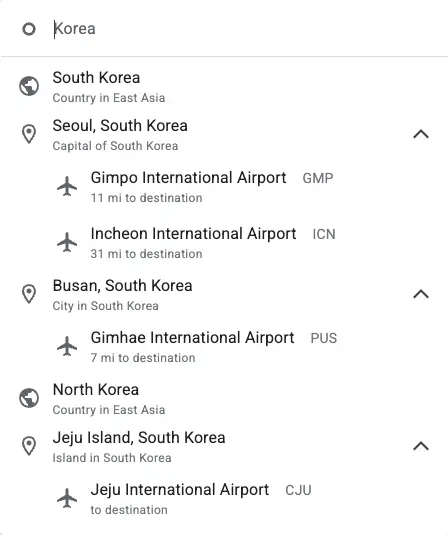
{
  "search_metadata": {
    "id": "694bb49ffe1c6b0c6eb476ab",
    "status": "Success",
    "json_endpoint": "https://serpapi.com/searches/4f9ed513191d2a44/694bb49ffe1c6b0c6eb476ab.json",
    "created_at": "2025-12-24 09:38:39 UTC",
    "processed_at": "2025-12-24 09:38:39 UTC",
    "google_flights_autocomplete_url": "https://www.google.com/travel/flights?hl=en&gl=us",
    "raw_html_file": "https://serpapi.com/searches/4f9ed513191d2a44/694bb49ffe1c6b0c6eb476ab.html",
    "prettify_html_file": "https://serpapi.com/searches/4f9ed513191d2a44/694bb49ffe1c6b0c6eb476ab.prettify",
    "total_time_taken": 1.03
  },
  "search_parameters": {
    "engine": "google_flights_autocomplete",
    "q": "Korea",
    "hl": "en",
    "gl": "us"
  },
  "suggestions": [
    {
      "position": 1,
      "name": "South Korea",
      "type": "region",
      "description": "Country in East Asia",
      "id": "/m/06qd3"
    },
    {
      "position": 2,
      "name": "Seoul, South Korea",
      "type": "city",
      "description": "Capital of South Korea",
      "id": "/m/0hsqf",
      "airports": [
        {
          "name": "Gimpo International Airport",
          "id": "GMP",
          "city": "Seoul",
          "city_id": "/m/0hsqf",
          "distance": "11 mi"
        },
        {
          "name": "Incheon International Airport",
          "id": "ICN",
          "city": "Seoul",
          "city_id": "/m/0hsqf",
          "distance": "31 mi"
        }
      ]
    },
    {
      "position": 3,
      "name": "Busan, South Korea",
      "type": "city",
      "description": "City in South Korea",
      "id": "/m/0hv7l",
      "airports": [
        {
          "name": "Gimhae International Airport",
          "id": "PUS",
          "city": "Busan",
          "city_id": "/m/0hv7l",
          "distance": "7 mi"
        }
      ]
    },
    ...
  ],
  ...
}
Example with exclude_regions: true
The exclude_regions parameter allows you to filter out region suggestions from the results, returning only city suggestions.
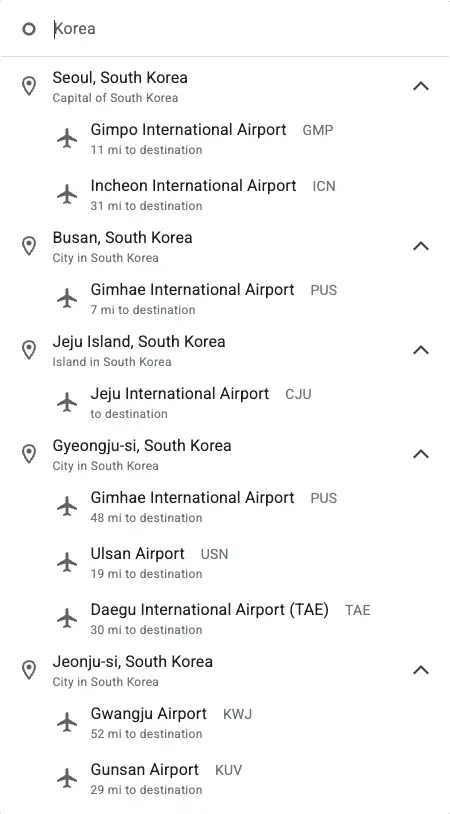
{
  ...
  "suggestions": [
    {
      "position": 1,
      "name": "Seoul, South Korea",
      "type": "city",
      "description": "Capital of South Korea",
      "id": "/m/0hsqf",
      "airports": [
        {
          "name": "Gimpo International Airport",
          "id": "GMP",
          "city": "Seoul",
          "city_id": "/m/0hsqf",
          "distance": "11 mi"
        },
        {
          "name": "Incheon International Airport",
          "id": "ICN",
          "city": "Seoul",
          "city_id": "/m/0hsqf",
          "distance": "31 mi"
        }
      ]
    },
    {
      "position": 2,
      "name": "Busan, South Korea",
      "type": "city",
      "description": "City in South Korea",
      "id": "/m/0hv7l",
      "airports": [
        {
          "name": "Gimhae International Airport",
          "id": "PUS",
          "city": "Busan",
          "city_id": "/m/0hv7l",
          "distance": "7 mi"
        }
      ]
    },
    {
      "position": 3,
      "name": "Jeju Island, South Korea",
      "type": "city",
      "description": "Island in South Korea",
      "id": "/g/121z6l6y",
      "airports": [
        {
          "name": "Jeju International Airport",
          "id": "CJU",
          "city": "Jeju-si",
          "city_id": "/m/03m9sv"
        }
      ]
    },
    ...
  ],
  ...
}
JSON Structure Overview
{
  ...
  "suggestions": [
    {
      "position": "Integer - Position of the suggestion in the list",
      "name": "String - Name of the suggested location",
      "type": "String - Type of the suggested location. Possible values are: <code>city</code> and <code>region</code>",
      "description": "String - Description of the suggested location",
      "id": "String - Google Knowledge Graph ID (<code>kgmid</code>) of the suggested location",
      "airports": [
        {
          "name": "String - Name of the airport",
          "id": "String - Airport code (IATA code)",
          "city": "String - City where the airport is located",
          "city_id": "String - Google Knowledge Graph ID (<code>kgmid</code>) of the city where the airport is located",
          "distance": "String - Distance from the city to the airport",
        },
        ...
      ]
    },
    ...
  ],
  ...
}