Google Translate API
Our Google Translate API allows you to translate text with Google Translate. It supports all Google Translate languages, detects the source language automatically, and returns the translation along with sentence pairs, pronunciations, gender-specific translations, spelling corrections, and dictionary data for words and short phrases, such as other translations, definitions, and examples.
The API endpoint is https://serpapi.com/search?engine=google_translate
Head to the playground for a live and interactive demo.
API Parameters
Advanced Parameters
from
Required
Parameter defines the language of the text you want to translate. It's a two or three-letter language code, optionally followed by a region or script code (e.g., es for Spanish, pt-PT for Portuguese (Portugal), or zh-CN for Chinese (Simplified)). Use auto to detect the language of the text. Head to the Google Translate languages page for a full list of supported languages.
to
Required
Parameter defines the language you want to translate the text into. It's a two or three-letter language code, optionally followed by a region or script code (e.g., es for Spanish, pt-PT for Portuguese (Portugal), or zh-CN for Chinese (Simplified)). Head to the Google Translate languages page for a full list of supported languages.
 Serpapi Parameters
no_cache
Optional
Parameter will force SerpApi to fetch the Google Translate results even if a cached version is already present. A cache is served only if the query and all parameters are exactly the same. Cache expires after 1h. Cached searches are free, and are not counted towards your searches per month. It can be set to false (default) to allow results from the cache, or true to disallow results from the cache. no_cache and async parameters should not be used together.
async
Optional
Parameter defines the way you want to submit your search to SerpApi. It can be set to false (default) to open an HTTP connection and keep it open until you got your search results, or true to just submit your search to SerpApi and retrieve them later. In this case, you'll need to use our Searches Archive API to retrieve your results. async and no_cache parameters should not be used together. async should not be used on accounts with Ludicrous Speed enabled.
zero_trace
Optional
Enterprise only. Parameter enables ZeroTrace mode. It can be set to false (default) or true. Enable this mode to skip storing search parameters, search files, and search metadata on our servers. This may make debugging more difficult.
output
Optional
Parameter defines the format of the result. It can be set to json (default) to get a structured JSON of the results, html to get the raw HTML retrieved, or md to get a markdown-formatted version optimized for LLMs and AI agents.
json_restrictor
Optional
Parameter defines the fields you want to include in the output, reducing payload size for faster response. See the JSON Restrictor documentation for more details.
API Results
JSON Results
JSON output includes structured data for translation, detected language, and sentence pairs.
A search status is accessible through search_metadata.status.
It flows this way: Processing -> Success || Error.
If a search has failed, error will contain an error message.
search_metadata.id is the search ID inside SerpApi.
HTML Results
This API does not have a full HTML response, only text.
search_metadata.prettify_html_file contains a link to the prettified version of the result.
It is displayed in the playground.
Markdown Results
Markdown output is optimized for LLMs and AI agents. It provides a curated view of the JSON results
in a token-efficient format using tables, markdown links, and YAML frontmatter.
To access, use the output=md parameter, the /search.md endpoint, or request header Accept: text/markdown.
API Examples
Example of a text translation with an auto-detected source language
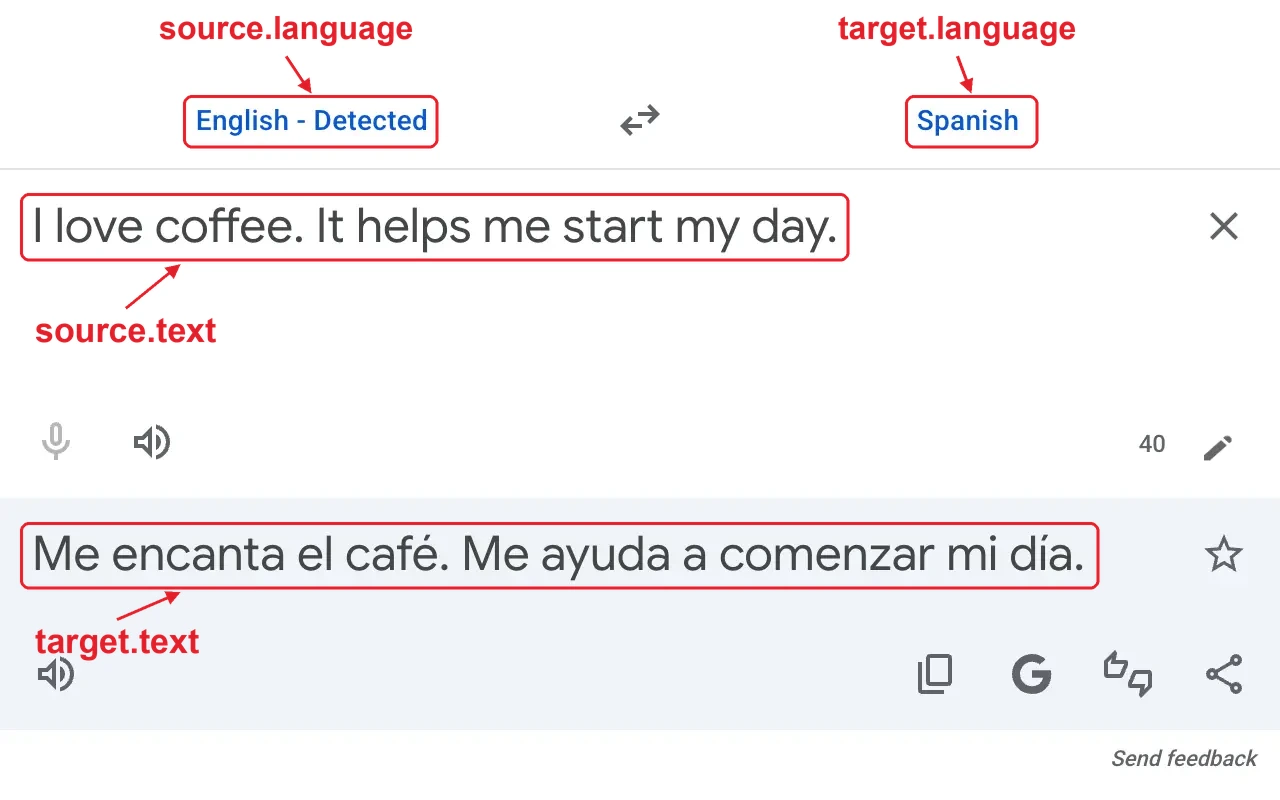
{
  ...
  "translation": {
    "source": {
      "language": "English",
      "language_code": "en",
      "language_confidence": 1.0,
      "text": "I love coffee. It helps me start my day."
    },
    "target": {
      "language": "Spanish",
      "language_code": "es",
      "text": "Me encanta el café. Me ayuda a comenzar mi día."
    },
    "sentences": [
      {
        "source": "I love coffee.",
        "target": "Me encanta el café."
      },
      {
        "source": "It helps me start my day.",
        "target": "Me ayuda a comenzar mi día."
      }
    ]
  }
}
Example of gender-specific translations
When the translation depends on gender, each variant is stored in gender_specific_translations.
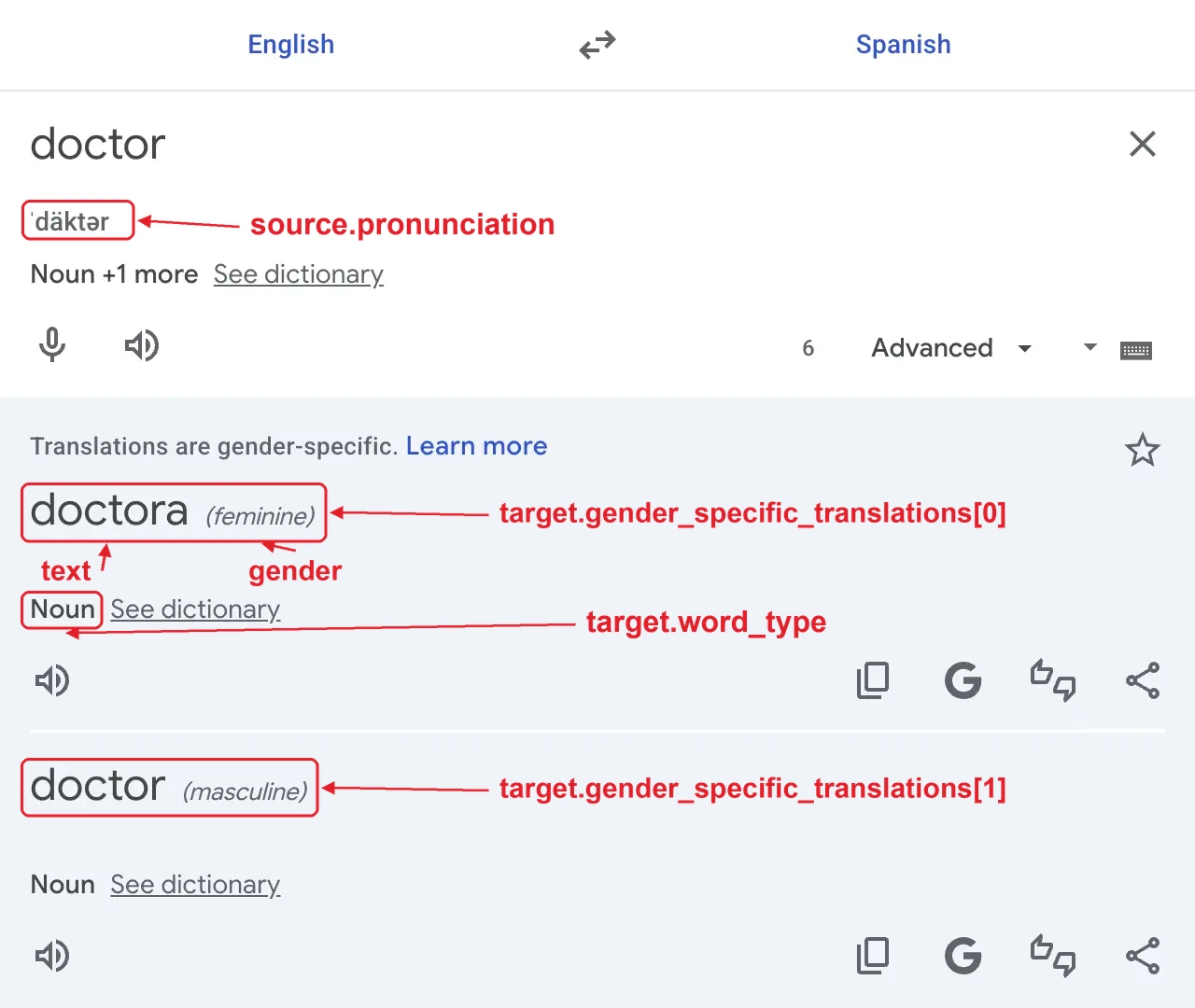
{
  ...
  "translation": {
    "source": {
      "language": "English",
      "language_code": "en",
      "language_confidence": 1.0,
      "text": "doctor",
      "pronunciation": "ˈdäktər",
      ...
    },
    "target": {
      "language": "Spanish",
      "language_code": "es",
      "text": "doctora",
      "word_type": "noun",
      "gender_specific_translations": [
        {
          "text": "doctora",
          "gender": "feminine"
        },
        {
          "text": "doctor",
          "gender": "masculine",
          "article": "el",
          "reverse_translations": ["doctor", "doc"]
        }
      ]
    },
    ...
  }
}
Example of a translation with dictionary data
When Google Translate has dictionary data for the text, such as a single word, the part of speech of the main translation is stored in word_type. Its article and reverse_translations are stored in target, or in the matching item of gender_specific_translations when the translation is gender-specific. Other translations are stored in more_translations, in the same order as on Google Translate. For languages with articles, such as French, nouns also include their article.
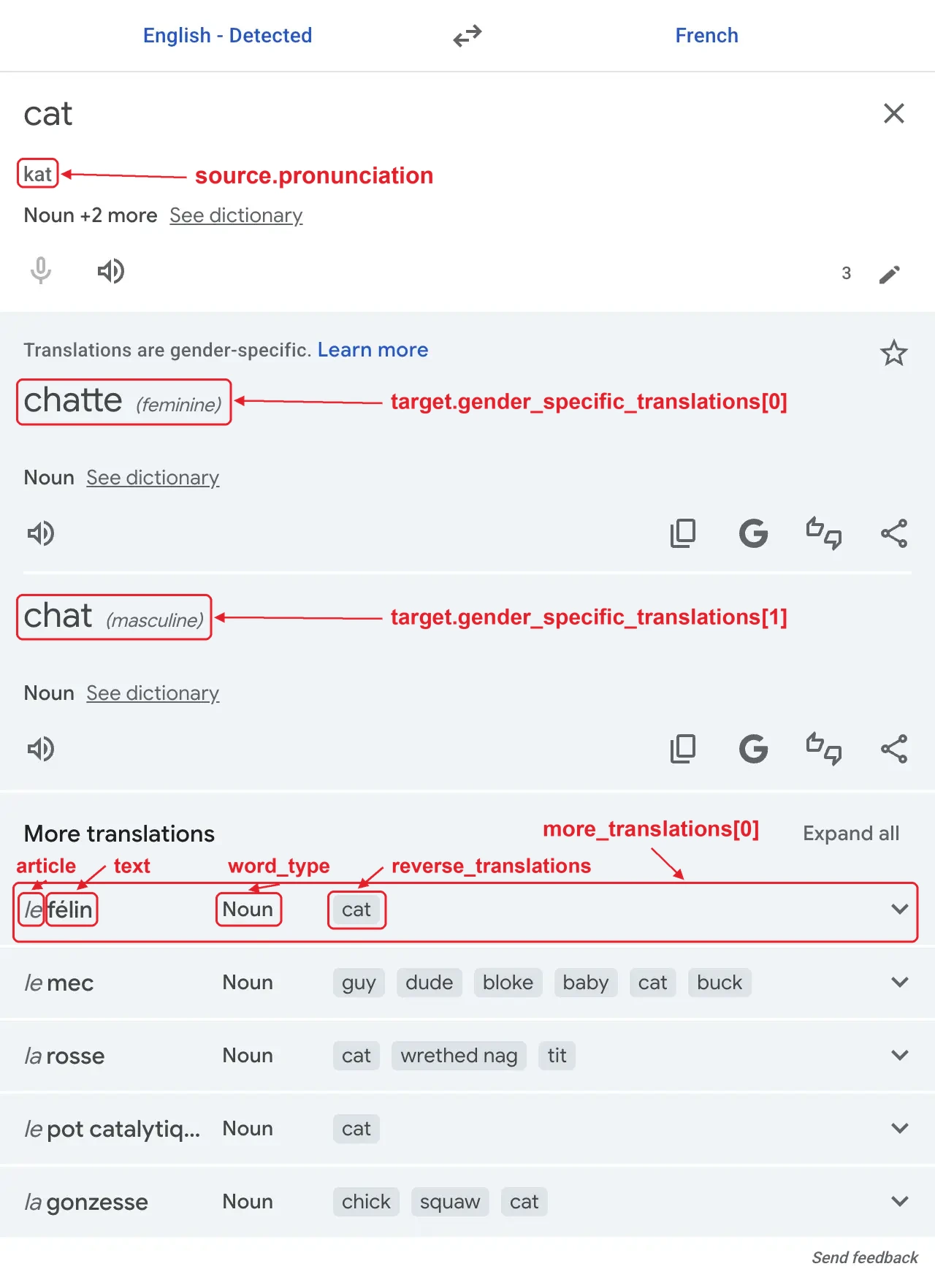
{
  ...
  "translation": {
    "source": {
      "language": "English",
      "language_code": "en",
      "language_confidence": 0.9631579,
      "text": "cat",
      "pronunciation": "kat",
      ...
    },
    "target": {
      "language": "French",
      "language_code": "fr",
      "text": "chatte",
      "word_type": "noun",
      "gender_specific_translations": [
        {
          "text": "chatte",
          "gender": "feminine"
        },
        {
          "text": "chat",
          "gender": "masculine",
          "article": "le",
          "reverse_translations": ["cat", "kitten", "puss", "gib"]
        }
      ]
    },
    "more_translations": [
      {
        "text": "félin",
        "article": "le",
        "word_type": "noun",
        "reverse_translations": ["cat"]
      },
      {
        "text": "mec",
        "article": "le",
        "word_type": "noun",
        "reverse_translations": ["guy", "dude", "bloke", "baby", "cat", "buck"]
      },
      {
        "text": "rosse",
        "article": "la",
        "word_type": "noun",
        "reverse_translations": ["cat", "wrethed nag", "tit"]
      },
      {
        "text": "pot catalytique",
        "article": "le",
        "word_type": "noun",
        "reverse_translations": ["cat"]
      },
      {
        "text": "gonzesse",
        "article": "la",
        "word_type": "noun",
        "reverse_translations": ["chick", "squaw", "cat"]
      }
    ]
  }
}
Example of definitions of a word
Definitions of the text are stored in definitions, in the same order as on Google Translate. Each definition can include an example of usage, labels, such as dated, and synonyms grouped by their own labels, such as informal. Example sentences with the text are stored in examples, and related words, such as good for better, in see_also.
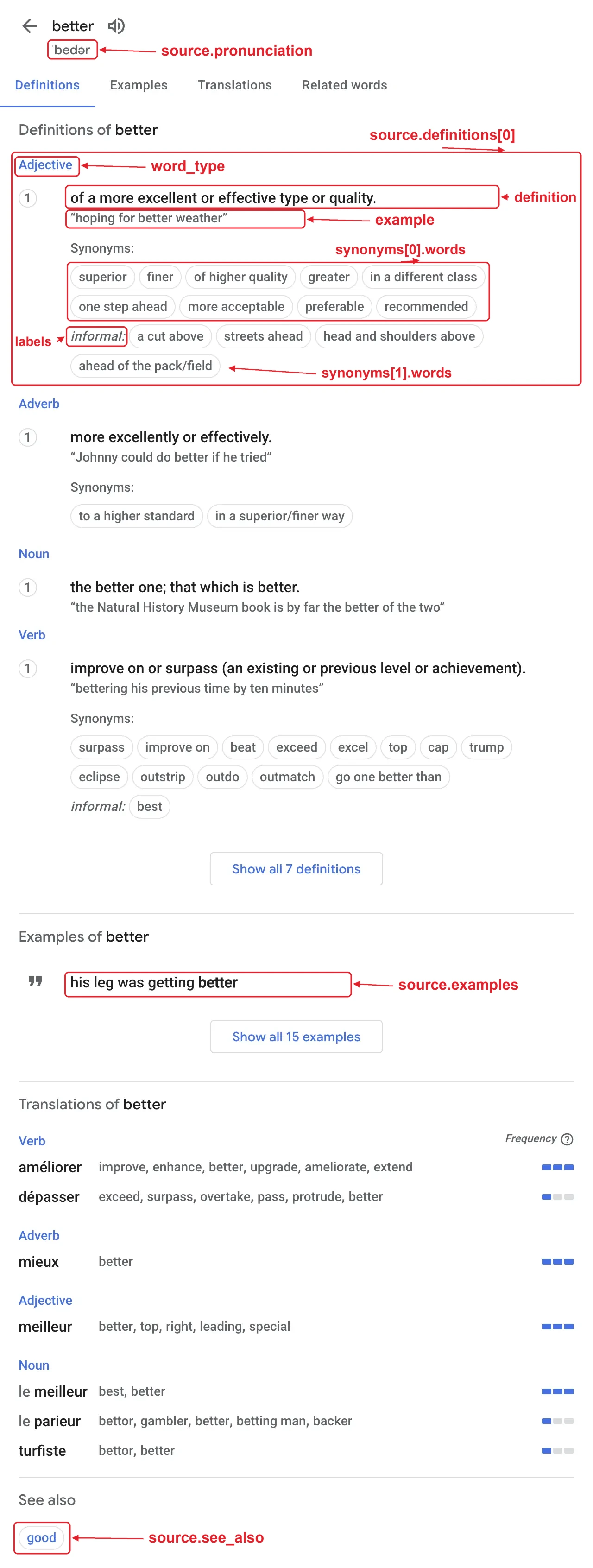
{
  ...
  "translation": {
    "source": {
      "language": "English",
      "language_code": "en",
      "language_confidence": 0.97894603,
      "text": "better",
      "pronunciation": "ˈbedər",
      "definitions": [
        {
          "word_type": "adjective",
          "definition": "of a more excellent or effective type or quality.",
          "example": "hoping for better weather",
          "synonyms": [
            {
              "words": ["superior", "finer", "of higher quality", "greater", "in a different class", "one step ahead", "more acceptable", "preferable", "recommended"]
            },
            {
              "words": ["a cut above", "streets ahead", "head and shoulders above", "ahead of the pack/field"],
              "labels": ["informal"]
            }
          ]
        },
        ...
        {
          "word_type": "noun",
          "definition": "one's superiors in social class or ability.",
          "example": "I'm not one to speak ill of my betters",
          "labels": ["dated", "humorous"]
        },
        ...
      ],
      "examples": [
        "the new facilities were far better",
        "we'll feel a lot better after a decent night's sleep",
        "I liked it better when we lived in the country",
        ...
      ],
      "see_also": ["good"]
    },
    "target": {
      "language": "French",
      "language_code": "fr",
      "text": "mieux",
      "word_type": "adverb",
      "reverse_translations": ["better"]
    },
    ...
  }
}
Example of a translation with a spelling correction
When Google Translate corrects the spelling of the text, the correction is stored in spelling_fix. If the corrected text was translated instead of the original one, it's also stored in showing_results_for, and sentences contain the corrected text.
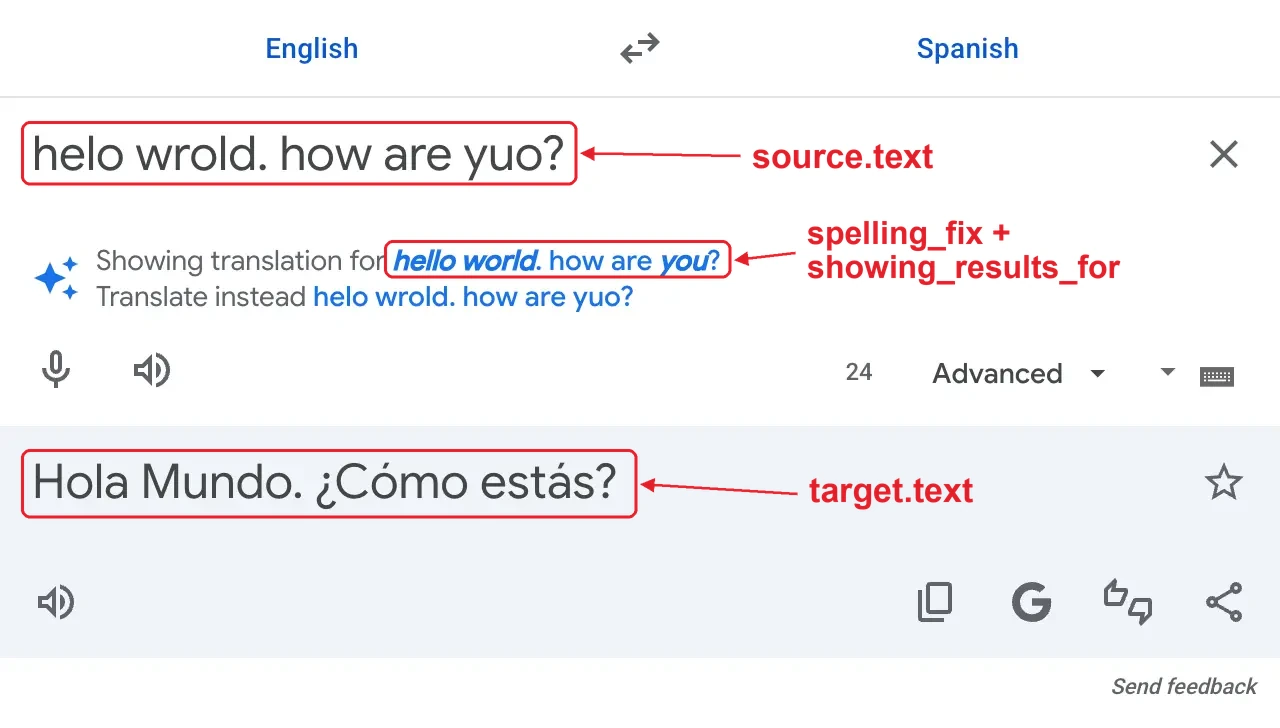
{
  ...
  "search_information": {
    "spelling_fix": "hello world. how are you?",
    "showing_results_for": "hello world. how are you?"
  },
  "translation": {
    "source": {
      "language": "English",
      "language_code": "en",
      "language_confidence": 0.9516601,
      "text": "helo wrold. how are yuo?"
    },
    "target": {
      "language": "Spanish",
      "language_code": "es",
      "text": "Hola Mundo. ¿Cómo estás?"
    },
    "sentences": [
      {
        "source": "hello world.",
        "target": "Hola Mundo."
      },
      {
        "source": "how are you?",
        "target": "¿Cómo estás?"
      }
    ]
  }
}
JSON Structure Overview
{
  ...
  "search_information": {
    "spelling_fix": "String - Spelling correction of the text suggested by Google Translate.",
    "showing_results_for": "String - Corrected text that was translated instead of the original text. Only present when Google Translate applied the spelling correction automatically."
  },
  "translation": {
    "source": {
      "language": "String - Name of the source language (e.g. `English`). When `from` is `auto`, it's the language detected by Google Translate. Not present when the language can't be detected, e.g. when the text is the URL.",
      "language_code": "String - Code of the source language (e.g. `en`). Present along with language.",
      "language_confidence": "Float - Confidence of Google Translate that the text is in the source language, from `0` to `1` (e.g. `0.97894603`). Only present when the language detected by Google Translate is the source language.",
      "text": "String - Text to translate.",
      "pronunciation": "String - Pronunciation of the text, such as the phonetic spelling of an English word (e.g. `ˈbedər`) or the romanization of a text in a non-Latin script (e.g. `Kon'nichiwa, genkidesuka?`).",
      "suggested_language": "String - Name of the language Google Translate suggests translating from, when the text seems to be in a different language than the one in from.",
      "suggested_language_code": "String - Code of the suggested language.",
      "suggested_language_confidence": "Float - Confidence of Google Translate that the text is in the suggested language, from `0` to `1`.",
      // When Google Translate has definitions of the text
      "definitions": [
        {
          "word_type": "String - Part of speech of the text for the definition (e.g. `adjective`).",
          "definition": "String - Definition of the text.",
          "example": "String - Example of usage for the definition.",
          "labels": "Array[String] - Labels of the definition (e.g. `dated`, `humorous`).",
          "synonyms": [
            {
              "words": "Array[String] - Synonyms of the text for the definition.",
              "labels": "Array[String] - Labels of the synonyms in addition to the labels of the definition (e.g. `informal`)."
            },
            ...
          ]
        },
        ...
      ],
      "examples": "Array[String] - Example sentences with the text. Only present when available.",
      "see_also": "Array[String] - Related words (e.g. `good` for `better`). Only present when available."
    },
    "target": {
      "language": "String - Name of the target language (e.g. `Spanish`).",
      "language_code": "String - Code of the target language (e.g. `es`).",
      "text": "String - Translated text.",
      "pronunciation": "String - Pronunciation of the translated text, such as the romanization of a text in a non-Latin script (e.g. `Zǎo ān, wǒ de péngyǒu.`).",
      "word_type": "String - Part of speech of the translated word (e.g. `noun`). Only present when the text has dictionary data.",
      "article": "String - Article of the translated word (e.g. `le`). Only present for nouns in languages with articles, such as French or German. Stored in `gender_specific_translations` instead when the translation is gender-specific.",
      "reverse_translations": "Array[String] - Words in the source language that translate back to the translated word. Only present when available. Stored in `gender_specific_translations` instead when the translation is gender-specific.",
      "link": "String - Link to the translated website on Google Translate. Only present when the text is the URL.",
      "gender_specific_translations": [
        {
          "text": "String - Translation for the gender.",
          "gender": "String - Gender of the translation (values: `feminine` or `masculine`).",
          "article": "String - Article of text (e.g. `le`). Only present for nouns in languages with articles, such as French or German.",
          "reverse_translations": "Array[String] - Words in the source language that translate back to text. Only present when available."
        },
        ...
      ]
    },
    // When Google Translate has dictionary data for the text
    "more_translations": [
      {
        "text": "String - Alternative translation of the text.",
        "article": "String - Article of text (e.g. `le`). Only present for nouns in languages with articles, such as French or German.",
        "word_type": "String - Part of speech of text (e.g. `noun`).",
        "reverse_translations": "Array[String] - Words in the source language that translate back to text. Only present when available."
      },
      ...
    ],
    // When the text has more than one sentence
    "sentences": [
      {
        "source": "String - Sentence of the text to translate. Contains the corrected text when `showing_results_for` is present.",
        "target": "String - Translated sentence."
      },
      ...
    ]
  }
}